Sign In Help
Assurant Okta is an on-demand service that allows you to easily sign-in to all the applications your organization uses through a single login.
Common Errors
You have entered an invalid username or password.
Use the "Unlock account?" link to unlock your account.
Use the "Unlock account?" link to unlock your account.
This error occurs because the user has not enrolled for Multifactor Authentication.
You will need to clear your browser cookies and cache.
Details
Chrome:- On your computer, open Chrome.
- At the top right, click More : (the shortcut keys are Control+Shift+Delete)
- Click More tools >Clear browsing data.
- At the top, choose a time range. To delete everything, select All time.
- Next to "Cookies and other site data" and "Cached images and files," check the boxes.
- Click Clear data
- Start at the gear icon in the upper right. For older versions of Internet Explorer, select the Tools menu.
- Select Safety > Delete Browsing History (the shortcut keys are Control+Shift+Delete).
- Select Temporary Internet Files just to clear the cache.
- Select the other check boxes as well if you also wish to remove to remove cookies, history, form data, passwords and InPrivate Filtering data.
- Press Delete
- If you use Safari,Firefox, or another browser, check its support site for instructions.
Frequently Asked Questions
MFA adds an extra security layer requiring multiple factors.
Details
Explanation:- Passwords are a single factor
- MFA requires two or more factors
- Protects even if one factor is compromised
- Something you know (password, PIN)
- Something you have (device)
- Something you are (biometric)
Steps
- Go to https://sso.assurant.com/
- Sign in with LAN ID
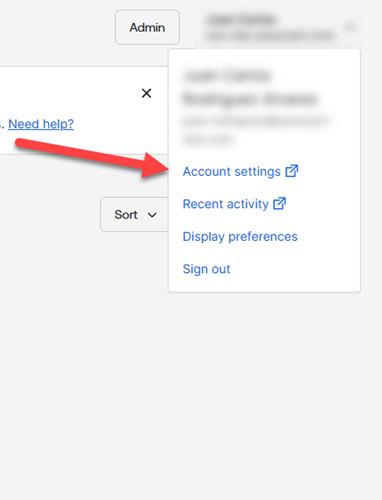
- Click your name
- Go to Account settings
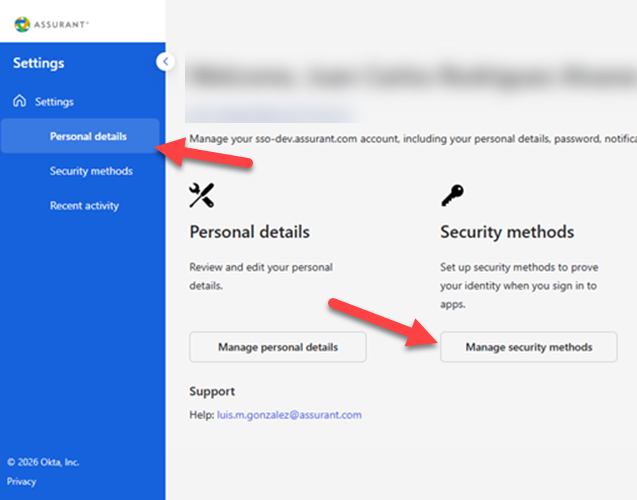
- Go to Personal details
- Click on Manage security methods
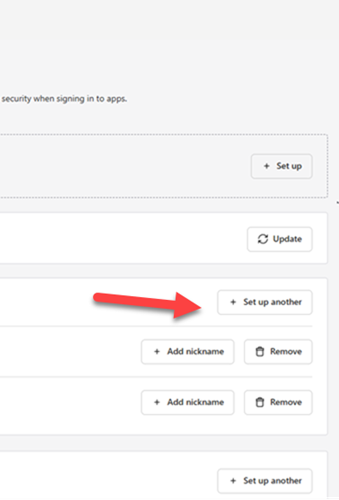
- Click on Set up another
Links
Images
Use your Assurant LAN ID and Password. If you forgotten your password, use the Assurant Password Manager (APM) or call the Assurant Help Desk to reset your password.
Links
Details
Note: APM is only available within the Assurant internal network
Use the "Unlock account?" link.
Supported Browsers
Supported Browsers
- Google Chrome v30+
- Mozilla Firefox v27+
- Microsoft Edge (all versions)
- Internet Explorer v11+
- Safari v7+